For Vinted sellers
List your wardrobe in an hour
You take photos with your phone, Flikki writes the listings, and a Chrome extension lists them on Vinted for you. You just check that everything is right.
No card needed. The free plan adds ten new items a month — each with a description and listed for you.
How it works
From photo to Vinted listing in three steps
- 1
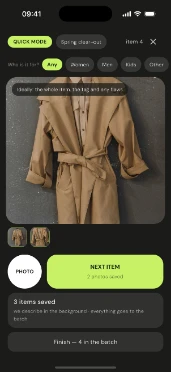
You take photos, you type nothing
Item by item, in quick mode. One tap and you’re on to the next one.
- 2
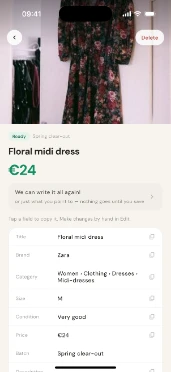
The listing writes itself
Brand, category, condition, size, price and description. You only fix what you don’t like.
- 3
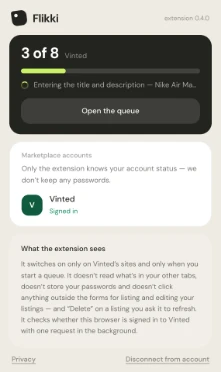
The extension lists on Vinted
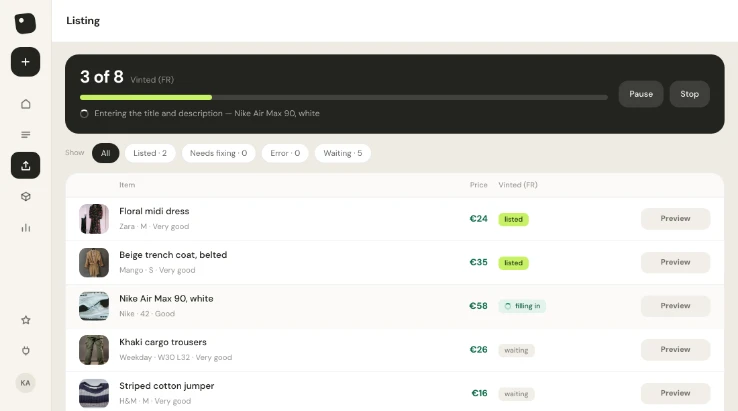
On your computer you tick the items and start a queue. Vinted’s forms fill in one after another.
Instead of a spreadsheet
All your things in one list
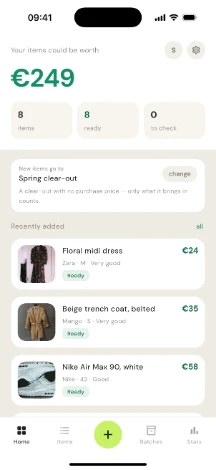
One list instead of a file that’s always on the other computer. See what you have, what’s already on Vinted, what’s sold and what it brought in.
Photos in one place, prices in another, and a formula nobody remembers.
 Mango beige trench coat, beltedMango · S / 36 · Summer wardrobe€35Ready
 Nike oversized hoodie, greyNike · XL · Vinted€22Listed
 Carhartt WIP Pocket T-shirtCarhartt WIP · M · Vinted€18To ship
 Mohito pleated midi skirtMohito · M / 38€20Sold
Everything at a glance
Photo, price, size, brand and status in one row. Filter and sort instead of scrolling a spreadsheet sideways.
Mark it sold in one click
Type what it sold for, and that’s it. Sales and summaries update themselves — no formulas.
And the best part: listing in bulk
You take the photos, we list. Tick everything that’s ready, start a queue and walk away from the computer.
Summaries
See where you stand
Know what you spent on these clothes? Enter it, and Flikki shows how much has already come back to you.
Group things your own way — “Kids’ clothes”, “Summer wardrobe” — with or without what you paid. And a thing doesn’t have to be in any group.
Kids’ clothes
42 items · bought for €160
€40still to come back
sold €120cost €160
Listing
Tick twenty items and go and make a cup of tea
The extension opens the form on your account, fills in the fields and uploads the photos — item by item, in front of you. If Vinted asks for something we don’t have, that one item waits in “Needs fixing” and the rest carry on.
 Nike oversized hoodie, greylisted
 Levi’s Trucker denim jacketfilling in
 Tommy Hilfiger check shirtneeds fixing
 Bershka light mom jeanswaiting
You can pause at any time.
Honestly
What Flikki doesn’t do
It doesn’t guess fees or shipping
We record only what an item sold for. The rest is Vinted’s business — that’s why your totals add up.
It doesn’t click anything without you
The extension wakes up only on Vinted’s sites, and only when you start a queue yourself. It doesn’t read your other tabs.
It doesn’t ask for your name or address
A first name or a nickname and an email are all it takes to sign up. Download or delete your data in two clicks.
Languages
Selling in Germany, France or the UK?
The app works in English or Polish. Pick your country in your account settings — new prices are entered in its currency, and your summaries add up in it.
Pricing
Free to start, Pro for more items
€0forever
For a wardrobe clear-out. Everything’s there, just on a smaller scale.
- 10 new items a month
- Each gets a description and is listed on Vinted for you
- Your list of things and sales summaries
€3.99/ 30 days
For one bigger clear-out, no subscription.
Everything in Free, plus:
- 100 new items in 30 days
- Quick mode on your phone — photos item after item
- Price changes on Vinted through the extension
€9.99/ month
€89/ year
For a big clear-out and lots of things at once.
Everything in Mini, plus:
- 500 new items a month
- Photo touch-ups
- Relisting — up to 20 a day
€17.99/ month
€159/ year
When there really are a lot of things.
Everything in Pro, plus:
- 2,000 new items a month
- Relisting — up to 100 a day
Prices include VAT.
Every plan writes at most 300 descriptions a day.
Questions you’d ask anyway
Does Flikki publish listings on its own?
No. The Chrome extension works only when you start a queue yourself, and only on Vinted’s sites. It fills in the form on your account, in your browser — you see every step and can pause or stop.
Where do the description and the price come from?
From the photos. We recognise the brand, category and condition, suggest a price and write the description. You can change anything before listing, or have it written again, choosing which fields we touch.
How do I list lots of items on Vinted quickly?
Photograph them with your phone, item by item — no typing. Flikki recognises the brand, category and condition, suggests a price and writes the description. Then, on your computer, tick the items that are ready and start a queue: the Chrome extension fills in Vinted’s forms one after another. That’s how your whole wardrobe gets listed in an hour.
Does Flikki work out fees and shipping?
No, and it won’t. We record what an item sold for — Vinted settles the rest. Pretending to know those numbers would give wrong totals, and we want your summaries to add up.
Do I need a phone to use it?
No. The phone is the fastest way, because it takes photos item by item, but in the browser you can upload photos from your computer or add an item by hand, even without photos.
What happens to my items if I leave Pro?
Nothing disappears. The free plan’s limits come back, you still see everything in your inventory, and you can download your data with the photos at any time.
How do I pay, and where’s my invoice?
Payments are handled by Link, a Stripe service: pay by card, Apple Pay, Google Pay or Link. After every payment Link e-mails you a receipt or invoice as a PDF, and your statement shows LINK.COM* FLIKKI. Manage your subscription in the app or on link.com. Prices on this page include VAT, and Link shows the full amount before you pay.
With Flikki, your wardrobe can be on Vinted tonight
Sign up, take a few photos and see a finished listing in minutes. No card, no commitment.